How to Schedule a Private Game With Friends

In our September 2024 Pinochle app release (5.2.0) we introduced a new feature to allow you to schedule a private game and send invites to friends from within the app. You can select the time and date, customize table game options, and send an invite to three friends. We also added a calendar so you can keep track of your scheduled games and see the status of which players accepted or declined the invite.

Note: this feature is currently only available in the Pinochle app; we haven’t made this available yet for Cutthroat or on the web. We are testing to see how well this is received and may consider adding/expanding on this in the future.

In this tutorial, we’ll walk through the steps and share some screenshots. If you have any questions or feedback on this new feature please send us a message or post in our forum.

#1 From the Main Menu, click on the Calendar button.

Pinochle App Main Menu Screenshot

#2 From the Game Schedule screen, click on the Plus button add add a new scheduled game.
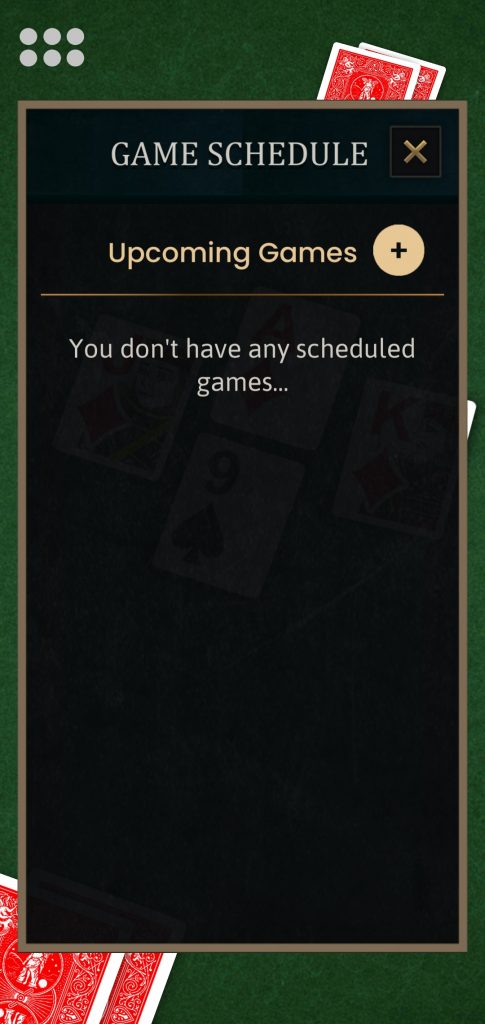
Pinochle Game Schedule Screenshot

3. Click on the gray Edit button next to the Date to select the date you want to schedule your game for.
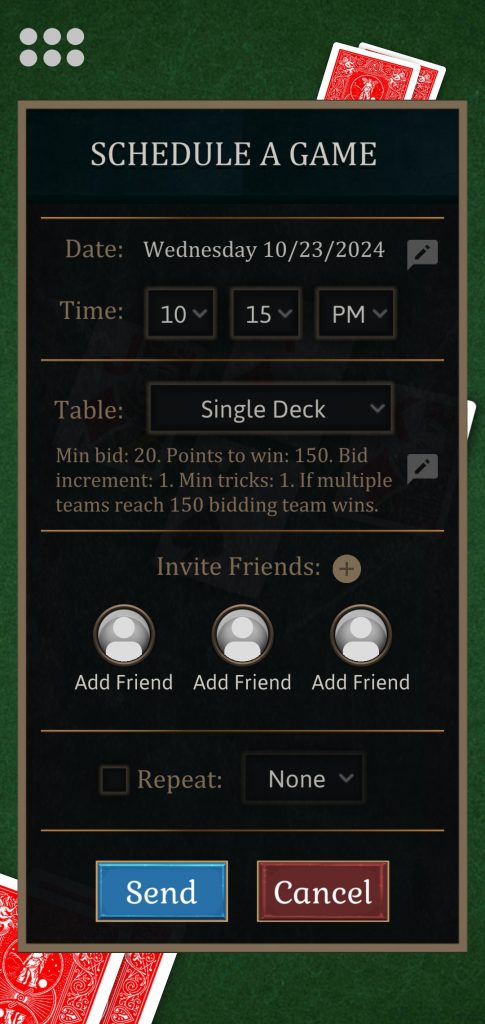
Pinochle Schedule Private Game

4. Use the calendar popup to choose a date. Press Update to save your selection.
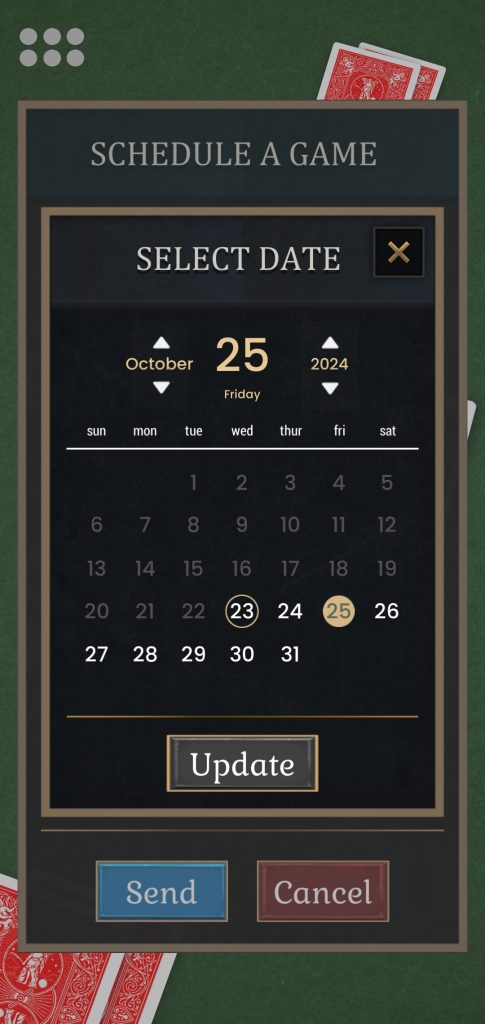
Pinochle Calendar Popup

#5 Use the drop down menus to select a time.
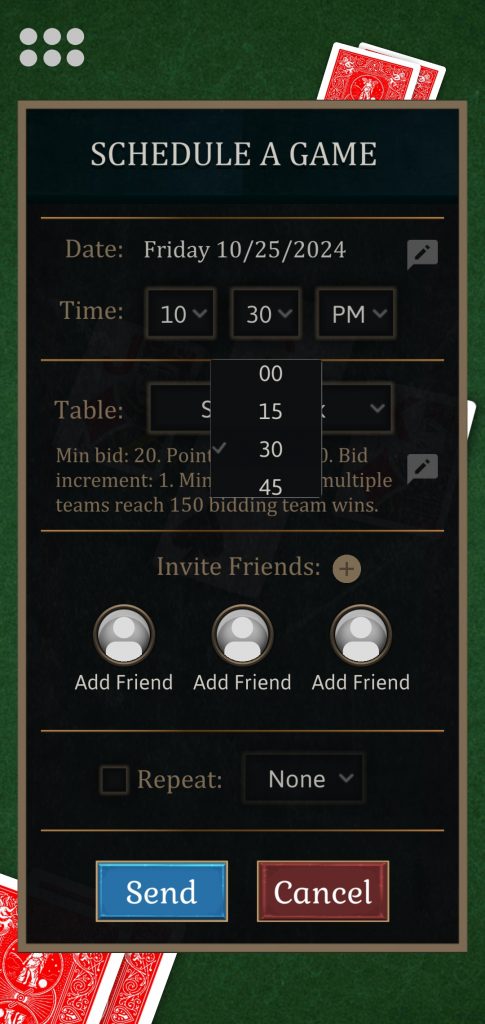
Pinochle Time Select Screenshot

#6 Choose from the drop down whether you want to play Single Deck, Double Deck, or Customize your table.
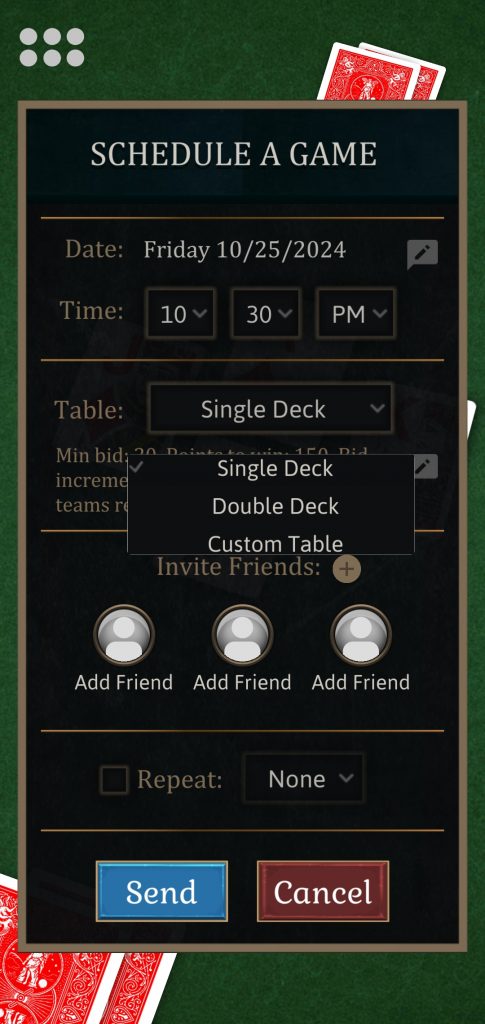
Pinochle Single Deck, Double Deck, Custom Table Selection

7. Select your preferred game options from the Table Settings menu.
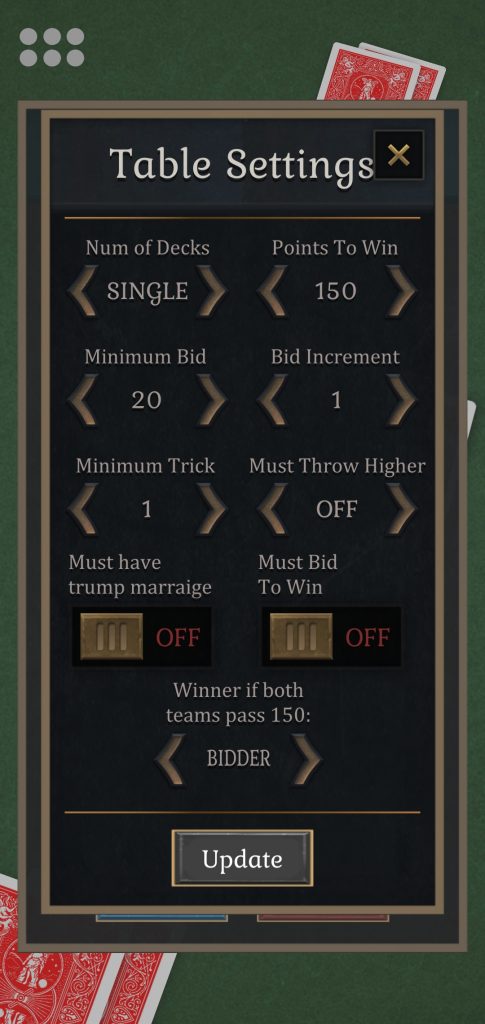
Pinochle Table Settings Game Options Screenshot

8. Click on the Plus button or Avatar buttons to select players from your friends list you want to invite.
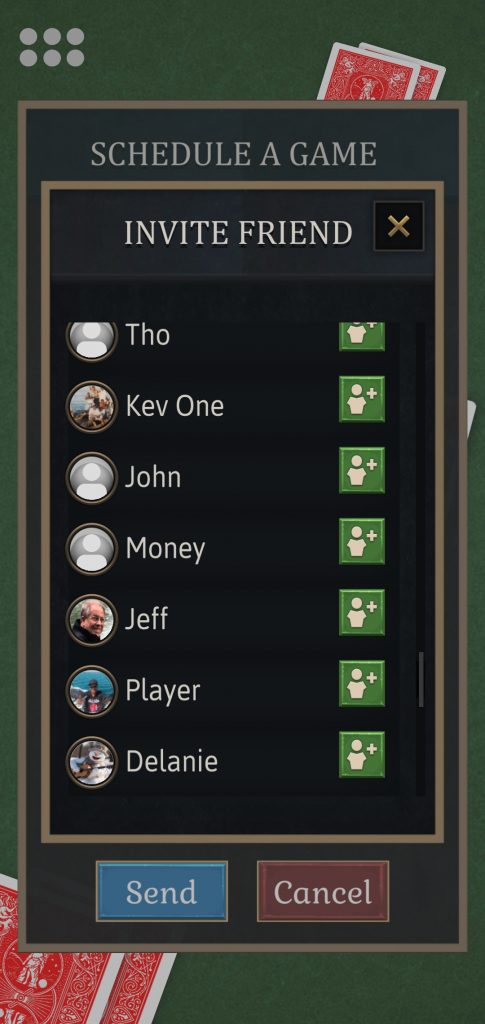
Pinochle Friends Select Screenshot

9. Check the recurrence check box if you want to schedule this game to repeat at the same time every week on the same day or daily.
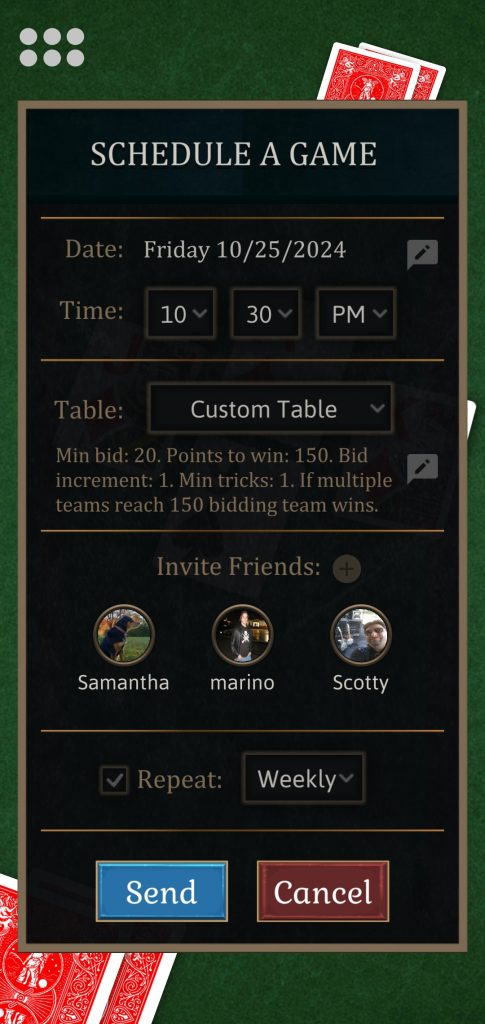
Pinochle Recurring Game Screenshot

10. Press the Send button to send the invite.
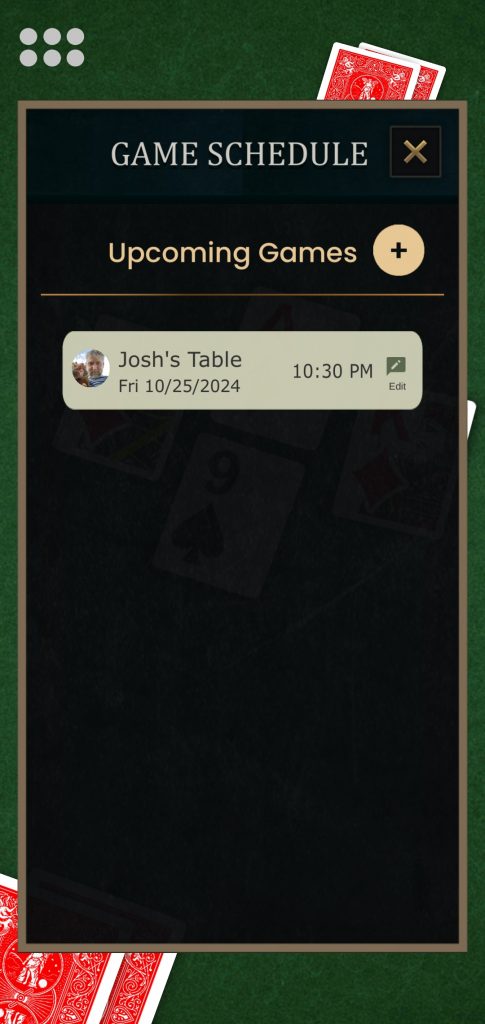
Pinochle Upcoming Games Screenshot

11. Click on the scheduled game from the Game Schedule screen to check the status.
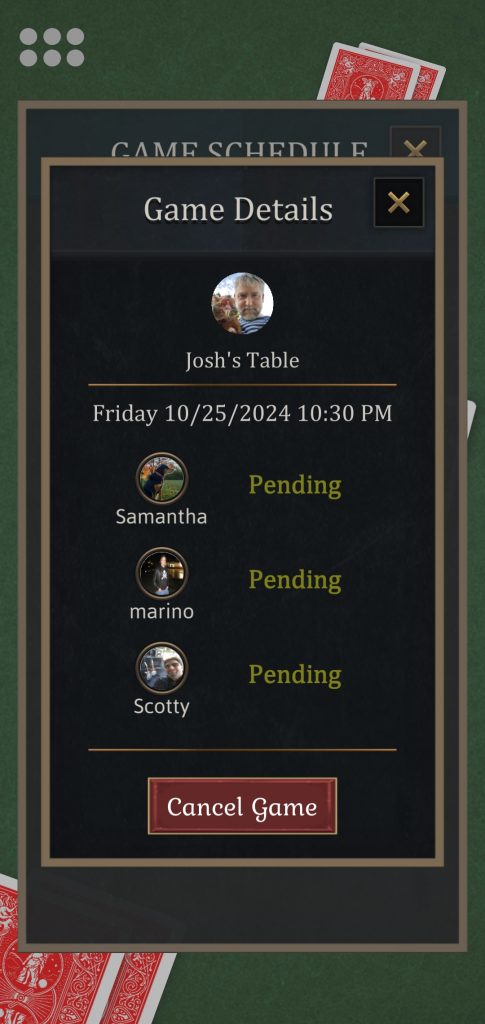
Pinochle Scheduled Game Details Screenshot

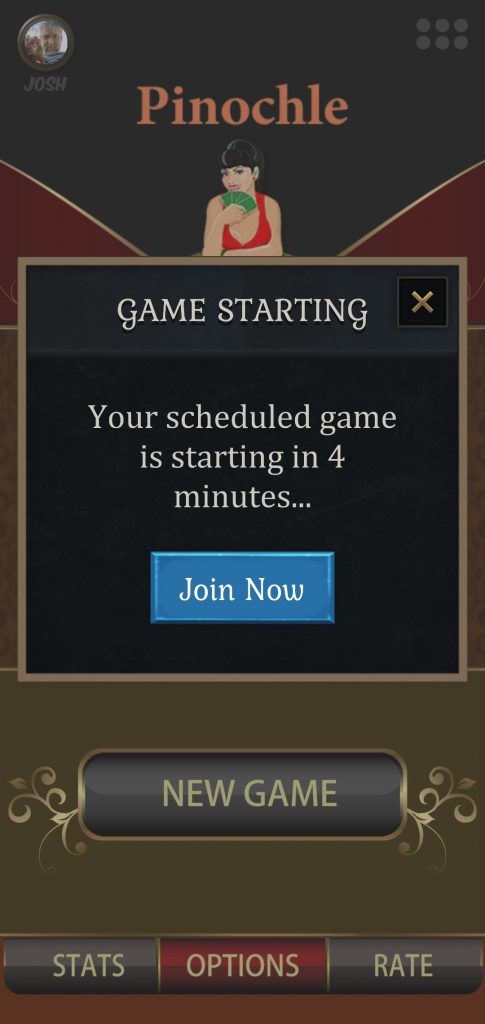
12. A few minutes before your game is scheduled to being be sure to log into the app. You can join the private table using the game code or just wait until the popup will tells you the game is about to being.
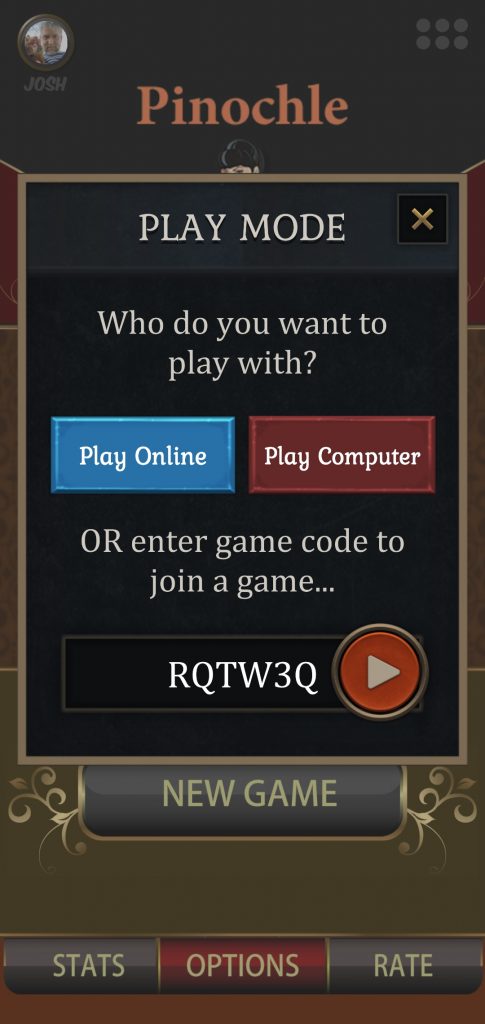
Pinochle Enter Game Code Screenshot
Pinochle Scheduled Game Starting Screenshot

13. Wait for other players to join. Click on blank Avatar buttons if you need to add a bot to fill an empty seat.
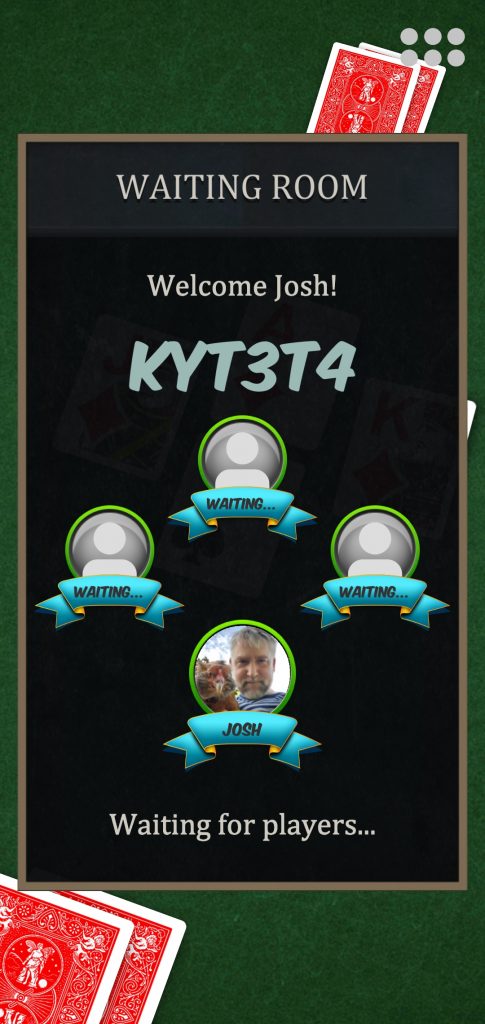
Pinochle Waiting Room Screenshot

Here’s a video of creating a scheduled game:

No comments

Leave a Reply

Online Now

  • Philippe

    Rating 11155
  • Teresa

    Rating 171
  • Dutch

    Rating 1888
  • Gina

    Rating 1809
  • Jeanne Lusk

    Rating 7126
  • T

    Rating 1900
  • tami

    Rating 1777
  • nan

    Rating 3358
  • Brian

    Rating 2884
  • BigE

    Rating 3497
  • Frank

    Rating 2211
  • Beth

    Rating 3051
  • luka

    Rating 2938
  • danielle

    Rating 3055
  • Player

    Rating 0
  • KristenG

    Rating 2756
  • Hunter

    Rating 3295
  • Bonnie

    Rating 2753
  • Piano Man

    Rating 2206
  • jenna

    Rating 3160
  • G O A T

    Rating 879
  • Bear

    Rating 4428
  • snake

    Rating 2831
  • Iconoclast

    Rating 3902
  • Babak

    Rating 1463
  • jemma

    Rating 1671
  • Vivien

    Rating 2039
  • Sam I Am Not

    Rating 3787
  • bryce

    Rating 2917
  • worm

    Rating 3509
  • Rocko

    Rating 414
  • Sonny

    Rating 1896
  • Pj

    Rating 1984
  • rip

    Rating 1799
  • Scotty

    Rating 3143
  • spectr

    Rating 915
  • ecker

    Rating 1572
  • starkey

    Rating 3035
  • Jodie

    Rating 2078
  • Omarcillo

    Rating 2575
  • Stan

    Rating 1661
  • Daenerys

    Rating 3160
  • thedon

    Rating 3435
  • Ernie

    Rating 43278
  • Kroll

    Rating 3185
  • Playerdp

    Rating 92
  • Sam

    Rating 1319
  • JodyBro

    Rating 2844
  • nurse

    Rating 3325
  • pete

    Rating 2193
  • Dee

    Rating 2664
  • Karina

    Rating 2816
  • Jim

    Rating 3006
  • Karen

    Rating 3097
  • Tragedy

    Rating 5296
  • sheldon

    Rating 1493
  • Trent

    Rating 2327
  • annie

    Rating 2666
  • craig

    Rating 2844
  • Antonina

    Rating 2325
  • jr

    Rating 3600
  • scoob

    Rating 1262
  • DrDeath

    Rating 2828
  • ramsey

    Rating 2144
  • Clark

    Rating 1470
  • bob

    Rating 2774
  • rebecca

    Rating 3218
  • Judd

    Rating 1145
  • MTG

    Rating 3209
  • Kling

    Rating 1871
  • Tiberius

    Rating 2508
  • brock

    Rating 3192
  • Player

    Rating 210
  • Zoogod

    Rating 2523
  • palmer

    Rating 3182
  • S Klump

    Rating 1875
  • cal

    Rating 3192
  • Player

    Rating 26
  • Decibel

    Rating 2156
  • marley420

    Rating 1969
  • derrick

    Rating 1941
  • dell

    Rating 2369
  • Sir

    Rating 2996
  • Nick

    Rating 2897
  • deb

    Rating 2803
  • wots

    Rating 3000
  • melody

    Rating 3319
  • Lenhoj

    Rating 15474
  • Storm

    Rating 2914
  • midge

    Rating 1963
  • Mark

    Rating 2643
  • megha

    Rating 2153
  • Ed

    Rating 725
  • Bubba

    Rating 1074

Today's Best Hand

  • Ernie

    Rating 43278
  • Joe

    Rating 17823
  • Dave

    Rating 16434
  • John

    Rating 15571
  • Lenhoj

    Rating 15474
  • Brady

    Rating 14580
  • Djs

    Rating 13806
  • Player

    Rating 13195
  • Kami

    Rating 12802
  • Otto

    Rating 12107